Lot number
(Not available in SenangUrus-Enterprise)
What is Lot Number?
Enabling Lot Number
To enable Lot Number tracking in the system, follow the steps below:
-
Go to Settings → Business Settings → Purchases
-
Check the Enable Lot Number checkbox
-
Click Update Settings to save the changes
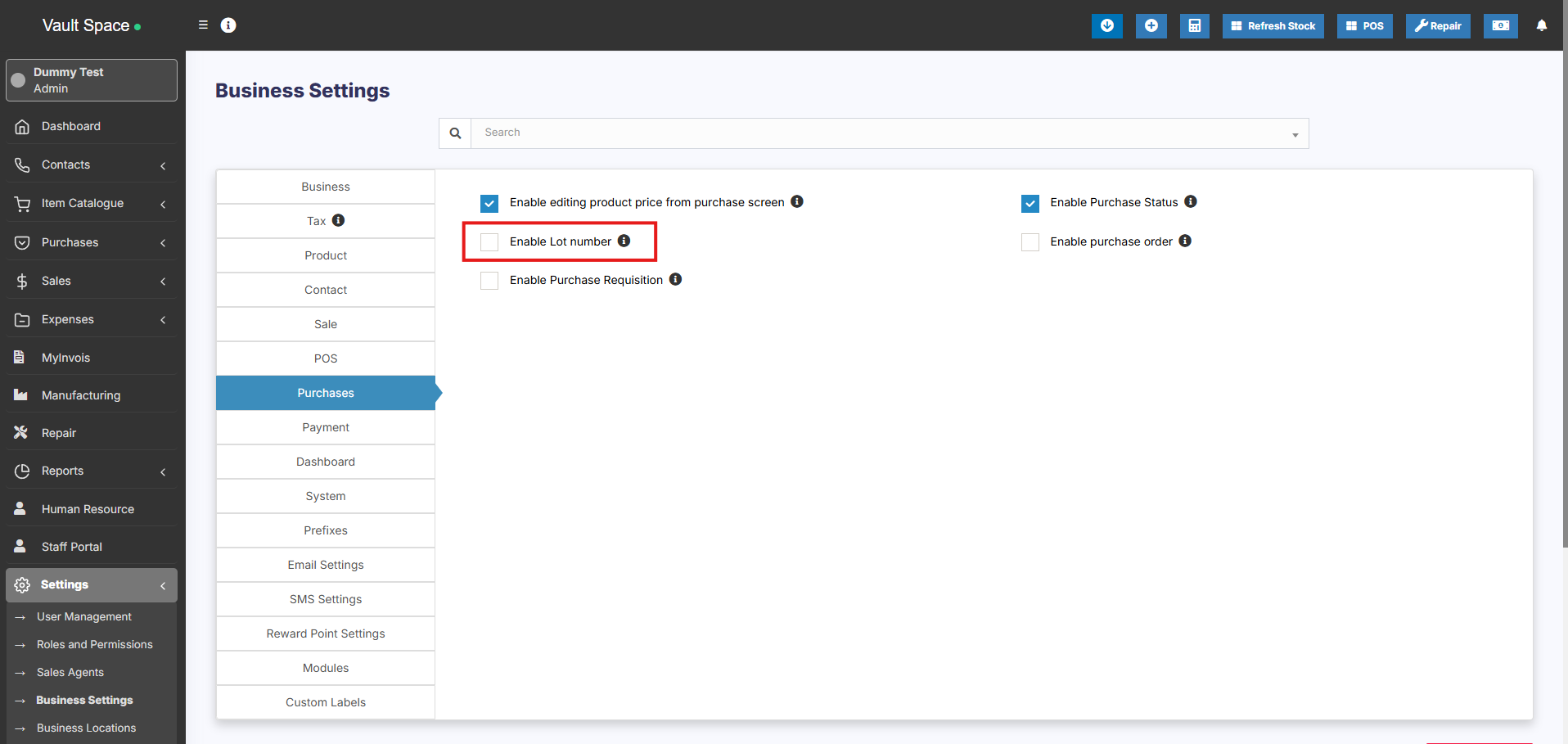
Once enabled, you’ll be able to assign Lot Numbers during both purchases and opening stock entries.
Two Methods to Add Lot Numbers
Method 1: Adding Lot Number from Purchases
-
When adding a Purchase Entry, the system will display a Lot Number field for each product.
-
Enter the Lot Number manually during stock entry.
Method 2: Adding Lot Number from Opening Stock
-
When adding Opening Stock, a Lot Number field will also be displayed for each item.
-
Fill in the appropriate Lot Number for accurate tracking.
Selling products from specific Lot
Refer to the POS selling documentation Lot number description.
Displaying product lot number in the invoice
- Make sure the lot number feature is enabled as mentioned above.
- Go to invoice layout and enable “Show lot number”
- If the lot number is added when adding Purchase or Opening stock then when making sales it will display the lot number & product expiry dropdown. Select the lot number which you want to sell. Then in the print invoice, it will show the lot number.